

WINJAY Radio Automation Software
Perfect transactions
The mySQL database engine offers virtually zero-maintenance integrity for your valuable data, high speed, reliable transactions and concurrent queries into a multiuser, multichannel configuration.
Multiformat playout engine
Multi-format, multi-overlap playout engine, supporting virtually any audio format: WAV PCM, ADPCM, mp3 (CBR and VBR), OGG Vorbis, WMA, FLAC, WavPack, MPC MusePack, AC3, AAC, MP4 (iTunes), APE Monkey Audio, OFR OptimFrog, TTA The True Audio, from standard to broadcast grade sound cards.
Multilanguage interface
The WinjayVX user interface is based on language files external to the application. They are user definable files allowing you to edit existing languages or easily add new ones.
Realtime RDS update
RDS doesn’t mean just the station name! WinjayVX turns the RDS into a dynamic feature, since the text can be automatically updated according to user-definable data: title/artist of songs being played, next song queued, date/time, free text (such as station name), based on dedicated RDS-playlists.
External feeds
WinjayVX allows seamless scheduling and integration of external feeds like satellite receivers or webcasts, optionally with remote triggering.
SMS box
Advanced SMS receiver based on mobile phones and USB GSM modems, with SMS juke-box allowing listeners to reuqest songs or systems administrators to fire command remotely (loading of playlists, etc.)
Powerful music scheduling
The integrated random music scheduler offers automatic songs rotation based on criteria like style, min/max date, nationality, vote, BPM, or any combination of the above selection criteria. You may decide to select on the fly or preview and manually edit the generated schedule.
Jingle palette
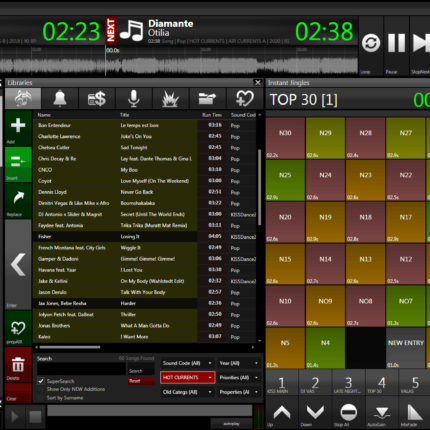
The WinjayVX multioverlap jingle palette features auto-mix, auto-fade and memo icons for each button.
Streaming ready
WinjayVX outputs songs/artists informations to update the end-user players on most common streaming platforms (Shoutcast, Icecast, Windows Media), and can be configured to update even more data based on a user-defined script.
Razor-blade audio editing
The powerful off-the-air cueing window offers ms-exact setting of required markers (Intro, mix-out, loops, etc) so you will always get the perfect mix with zero effort.
Commercial scheduling
WinjayVX integrates a comprehensive commercial planner, a perfect match between features offered and ease of use. Scheduling commercials is easy as a few clicks on desired slots, and you may use shuffle, priority and date/based planning.
Related products